
Introduction
Creating a website involves more than choosing a design and publishing pages. Behind every website are several technologies and services that work together to make the site accessible to visitors.
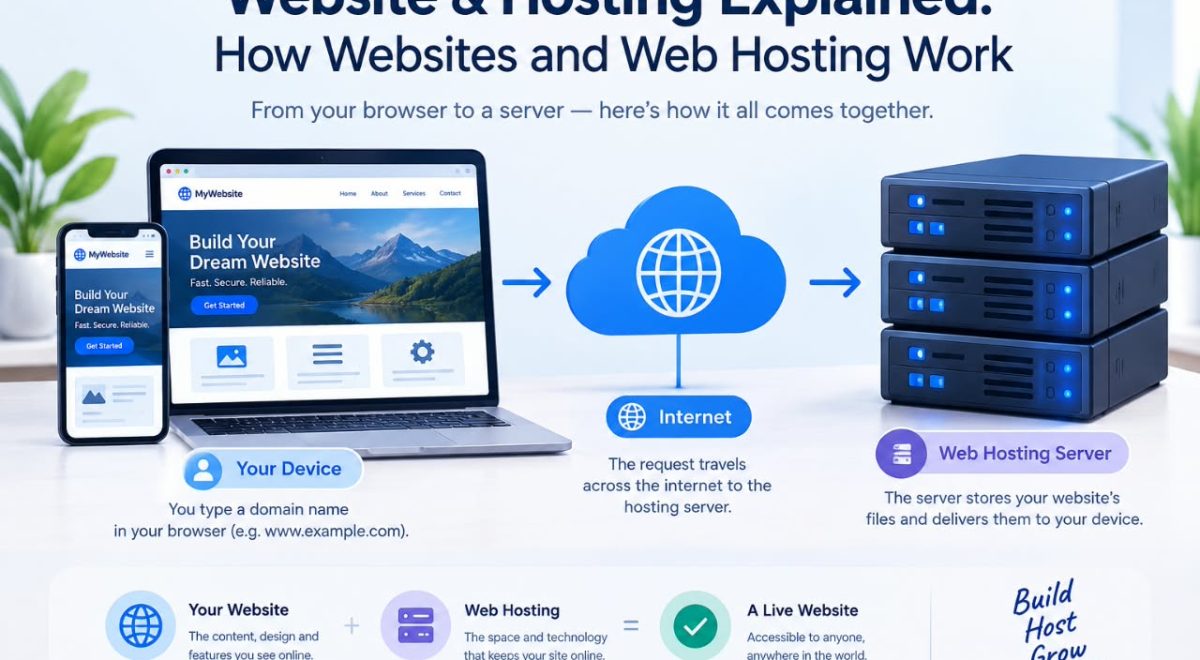
Two of the most important concepts are websites and web hosting. A website contains the pages, images, text, applications, and other content that visitors interact with. Web hosting provides the server space and infrastructure needed to store that website’s files and deliver them to users over the internet.
In this Website & Hosting Explained guide, you will learn how websites work, what web hosting does, how domains fit into the process, the main types of hosting, how to choose a hosting plan, and what beginners should consider before launching a website.
What Is a Website?
A website is a collection of related web pages and digital resources that people can access through the internet using a web browser.
For example, a business website might contain:
- A homepage
- About page
- Services or products
- Blog
- Contact page
- Privacy policy
- Terms and conditions
Websites can be simple or highly complex. A personal blog may consist primarily of text and images, while an online store may include product databases, shopping carts, payment systems, customer accounts, and order management.
How Websites Work
When you visit a website, several things happen behind the scenes.
A simplified process looks like this:
Visitor → Domain name → DNS → Web server → Website files → Browser
For example, when someone enters a domain name into a browser, the browser needs to determine which server hosts that website. The Domain Name System, or DNS, helps connect the domain name with the appropriate server address.
The server then sends the requested files or data to the browser, which displays the website.
What Is Web Hosting?
Web hosting is a service that provides the infrastructure needed to make a website available online.
Website files have to be stored somewhere. Hosting companies operate servers that store these files and provide the network connections and software required to deliver websites to visitors.
Without hosting, a typical website would not have a publicly accessible place to store its files and serve them to internet users.
What Does a Web Host Provide?
Depending on the hosting package, a provider may offer:
- Server storage
- Computing resources
- Database support
- Email services
- Security features
- Backups
- SSL/TLS support
- Domain management tools
- Website management panels
- Technical support
The exact features depend on the provider and hosting plan.
It is the most important place to host your data and the necessary services for presentation on the internet.
Website vs. Web Hosting: What Is the Difference?
The terms website and web hosting are closely related, but they are not the same thing.
A website is the actual digital content and functionality that visitors see and use.
Web hosting is the service and server infrastructure used to store and deliver that website.
An easy way to understand the difference is to compare a website to a physical store.
- Website: The store, products, signs, and information.
- Web hosting: The physical space and infrastructure where the store operates.
- Domain name: The address customers use to find the store.
This is only an analogy, but it makes the relationship easier to understand.
What Is a Domain Name?
A domain name is the human-readable address used to access a website.
For example:
example.com
Instead of requiring visitors to remember a numerical IP address, DNS allows a domain name to be associated with the appropriate internet address.
A domain and web hosting are therefore different services.
You can register a domain with one company and host your website with another, although many providers offer both services together.
Domain Name vs. Hosting
| Feature | Domain Name | Web Hosting |
| Main purpose | Website address | Website storage and delivery |
| Example | example.com | Server space |
| Required for a typical public website | Usually | Yes |
| Can be purchased separately | Yes | Yes |
| Connects visitors to | Website location | Website files and services |
Which One Do You Need?
The choice depends on what you are trying to set up:
- Need a website address? → You need a domain name.
- Need somewhere to store and deliver your website? → You need web hosting.
- Want to launch a typical self-hosted website? → You generally need both a domain and hosting.
- Using a website builder? → Hosting may already be included as part of the platform.
Understanding what each service does can help you avoid purchasing services you do not need.
How Does Web Hosting Work?
When you purchase a hosting plan, your website is placed on a server operated or managed by the hosting provider.
When a visitor requests your website, the hosting infrastructure processes that request and sends the necessary content back to the visitor’s browser.
A simplified process is:
Step 1: A Visitor Enters Your Domain
Someone types your domain into a browser or clicks a link to your website.
Step 2: DNS Finds the Server
The DNS system helps determine which server or service is responsible for the domain.
Step 3: The Browser Requests Content
The browser sends a request for the website’s resources.
Step 4: The Server Responds
The server provides the requested HTML, CSS, JavaScript, images, database information, or other resources.
Step 5: The Browser Displays the Website
The browser processes the received information and displays the page to the visitor.
Modern websites can involve additional systems such as content delivery networks, caching, databases, application servers, and security services, but this basic process explains the fundamental concept.
Main Types of Web Hosting
Different websites have different technical requirements. Hosting companies therefore offer several types of hosting.
Shared Hosting
Shared hosting places multiple websites on the same physical server and its resources.
It is commonly used for smaller websites, blogs, portfolios, and new projects.
Advantages
- Generally simple to manage
- Often inexpensive
- Suitable for many beginner websites
- Hosting provider usually handles much of the server administration
Limitations
Because resources are shared, performance and available resources can be more limited than with higher-level hosting options.
Shared hosting can be a practical starting point, but the appropriate choice depends on the website’s requirements.
VPS Hosting
A Virtual Private Server, or VPS, provides a virtualized server environment with more control and allocated resources than typical shared hosting.
VPS hosting can be useful for websites and applications that have outgrown basic shared hosting or require greater configuration flexibility.
Advantages
- More control
- More configurable environment
- Greater resource allocation
- Suitable for more demanding websites
Limitations
- Usually costs more than basic shared hosting
- May require more technical knowledge
- Server management can be more complicated
Cloud Hosting
Cloud hosting uses a cloud infrastructure rather than relying on a traditional single-server setup.
Depending on the provider and architecture, resources can be distributed across multiple systems.
Cloud hosting is often used when flexibility, scalability, or particular infrastructure features are important.
However, “cloud hosting” can mean different things depending on the provider, so it is important to examine the actual specifications rather than choosing a plan based only on the label.
Dedicated Hosting
Dedicated hosting provides an entire physical server for one customer.
This can provide substantial control and resources, making it suitable for certain high-demand websites and applications.
Advantages
- Dedicated server resources
- High level of control
- Greater configuration flexibility
Limitations
- Higher cost
- Greater management responsibility
- Often unnecessary for small websites
Managed Hosting
Managed hosting means the hosting provider handles some server administration and maintenance tasks for the customer.
The exact meaning of “managed” varies between providers.
Some managed plans may include updates, security monitoring, backups, performance management, or technical assistance.
Always check what is actually included before purchasing.
WordPress Hosting
WordPress hosting is designed specifically for websites built with WordPress.
Depending on the provider, WordPress hosting may include features such as automated updates, specialized caching, security tools, backups, and simplified WordPress management.
However, not every WordPress website requires a specialized hosting plan. A standard hosting environment can also support WordPress if it meets the software’s requirements.
Hosting Type Comparison
Each hosting type is designed for different website requirements. The table below provides a quick comparison of the main options discussed above:
| Hosting Type | Best For | Main Advantage | Main Limitation |
|---|---|---|---|
| Shared Hosting | Small websites | Simple and affordable | Shared resources |
| VPS Hosting | Growing websites | More control | More technical |
| Cloud Hosting | Flexible projects | Scalable infrastructure | Can be more complex |
| Dedicated Hosting | High-demand projects | Dedicated resources | Higher cost |
| Managed Hosting | Users wanting less administration | Provider handles some tasks | Usually costs more |
The right choice depends on factors such as your website’s size, technical requirements, expected traffic, budget, and how much server management you want to handle yourself.
My Practical Recommendation: Start by identifying your website’s actual requirements instead of choosing hosting based only on popularity or price. A small website may not need an advanced hosting environment, while a growing or technically demanding project may require more resources and control.
What Is a Web Server?
A web server is a computer system or software environment that handles requests for web resources and delivers content to clients such as web browsers.
The term “server” can refer to the physical or virtual machine as well as the software running on it.
Web servers commonly handle requests for files such as:
- HTML documents
- CSS files
- JavaScript
- Images
- Fonts
- Other web resources
Dynamic websites can also communicate with databases and application software to generate content.
Static vs. Dynamic Websites
Websites can be broadly described as static or dynamic.
Static Websites
A static website generally delivers pre-created files to visitors.
Examples include:
- Personal portfolios
- Simple business websites
- Documentation sites
- Basic informational websites
Static sites can be relatively simple to host and maintain.
Dynamic Websites
Dynamic websites generate or retrieve content based on requests, databases, user accounts, or other application logic.
Examples include:
- Online stores
- Social platforms
- Membership websites
- Content management systems
- Web applications
Dynamic websites generally require additional server-side technologies and database support.
What Is an SSL Certificate?
SSL/TLS technology helps protect data transmitted between a visitor’s browser and a website.
Websites using HTTPS establish an encrypted connection between the browser and server.
A secure connection is especially important when websites handle information such as login credentials, contact information, or transactions.
Modern websites should use HTTPS, and website owners should check that their hosting setup supports proper SSL/TLS configuration.
What Should You Look for in Web Hosting?
Choosing a hosting provider should involve more than comparing the advertised monthly price.
Consider the following factors.
1. Performance
Look at the resources included with the plan and the provider’s infrastructure.
Performance can depend on many factors, including server resources, website software, caching, databases, traffic levels, and how the website is built.
2. Reliability
A website needs hosting infrastructure that is dependable.
Look for clear information about reliability, monitoring, maintenance, and service policies.
3. Security
Useful hosting security features may include:
- SSL/TLS support
- Malware monitoring
- Firewall protection
- Account security
- Regular software updates
- Backup options
No hosting provider can eliminate every security risk, so website owners should also maintain secure passwords, updated software, and appropriate access controls.
4. Backups
Backups can help recover a website after accidental deletion, software problems, or other incidents.
Check how frequently backups are created, how long they are retained, and whether restoring them is included.
A backup system is most useful when you understand how to actually restore your website.
5. Storage
Check how much storage your website requires.
A small blog may need relatively little space, while a website containing large images, videos, downloads, or databases may require considerably more.
6. Bandwidth and Traffic Limits
Some hosting plans place limits on traffic or resource usage.
Read the provider’s terms carefully so you understand what happens if your website grows beyond the included resources.
7. Customer Support
Good support can be particularly valuable for beginners.
Check which support channels are available and whether support is available when you need it.
8. Scalability
Your website may start small and grow over time.
Choose a hosting environment that allows you to upgrade resources or move to a more suitable hosting type when necessary.
Hosting Selection Checklist
Before purchasing a hosting plan, use this checklist to compare the options and make sure the plan matches your website’s actual needs:
- What type of website are you building? – Consider whether it is a blog, business website, portfolio, online store, or web application.
- How much storage do you need? – Estimate your current storage requirements and allow reasonable room for future content.
- Does the plan support your website platform? – Check that the hosting environment supports the CMS, website builder, or software you plan to use.
- What is the regular renewal price? – Do not compare only introductory prices. Check what you will pay when the promotional period ends.
- Are backups included? – Check how often backups are created, how long they are retained, and how restoration works.
- What security features are included? – Review features such as HTTPS support, account security, malware monitoring, or other protections offered by the provider.
- What support options are available? – Check whether support is available through the channels you are comfortable using.
- Can you upgrade later? – Make sure the hosting environment provides a practical upgrade path if your website grows.
- Are there traffic or resource limits? – Review the plan’s resource policies so you understand what happens if your website exceeds its included limits.
- Are migration services available? – If you already have a website, check whether the provider offers migration assistance and what is included.
My Practical Recommendation: Compare hosting plans using your website’s actual requirements rather than choosing based only on the lowest price or the largest number of advertised features.
How Much Does Web Hosting Cost?
There is no single price for web hosting.
Costs vary depending on factors such as:
- Hosting type
- Server resources
- Contract length
- Included features
- Backup services
- Managed services
- Storage
- Traffic allowances
- Provider
- Renewal pricing
Some hosting plans are designed for beginners and small websites, while advanced hosting environments can cost significantly more.
When comparing prices, look beyond the introductory offer. Check the renewal price, included resources, additional fees, and what happens if you need to upgrade.
Common Hosting Mistakes Beginners Should Avoid
Understanding common mistakes can save time and money.
Choosing Only Based on Price
The cheapest plan may not provide the resources, support, or features your website needs.
Instead, compare the complete package.
Ignoring Renewal Prices
Some hosting providers advertise an introductory price that differs from the regular renewal rate.
Always check the price that will apply after the initial promotional period.
Buying More Resources Than Necessary
A new informational website may not need an expensive dedicated server.
Start with an appropriate plan and upgrade when your actual requirements justify it.
Forgetting Backups
Do not assume that every backup system works exactly the same way.
Understand what is backed up and how restoration works.
Using Outdated Software
Website platforms, plugins, themes, and server software can contain security vulnerabilities when they are not maintained.
Keep supported software updated and remove components you no longer use.
Ignoring Website Security
Use strong passwords, secure administrator accounts, HTTPS, software updates, and appropriate permissions.
Security should be treated as an ongoing responsibility rather than a one-time setup task.
How to Start a Website
For a beginner, launching a website can be broken into a few manageable steps.
Step 1: Define Your Website’s Purpose
Decide what the website is supposed to accomplish.
It could be:
- A blog
- Business website
- Portfolio
- Online store
- Educational resource
- Community website
- Personal website
Your purpose will influence the technology and hosting you need.
Step 2: Choose a Domain Name
Choose a domain that is relevant, easy to remember, and appropriate for your project.
Check availability through a legitimate domain registrar.
Step 3: Choose Web Hosting
Select a hosting plan based on your website’s expected requirements rather than simply choosing the most expensive option.
Step 4: Connect the Domain and Hosting
If your domain and hosting are purchased from different providers, you will need to configure DNS settings so the domain points to the appropriate hosting service.
Step 5: Install Your Website Platform
Depending on your project, you might use WordPress, another content management system, a website builder, or custom-developed software.
Step 6: Create Useful Content
Build clear pages that help visitors understand your website and find the information they need.
Step 7: Secure and Maintain the Website
Enable HTTPS, keep software updated, maintain backups, monitor performance, and review security settings regularly.
Website Pre-Launch Checklist
Before making your website publicly available, check the following:
- Domain connected correctly – Make sure your domain points to the correct website.
- HTTPS working – Confirm that your website loads securely with HTTPS.
- Navigation tested – Check that the main menu and navigation links work correctly.
- Contact forms tested – Submit test messages to make sure forms work properly.
- Mobile layout checked – Review the website on a phone or tablet to make sure the layout is usable.
- Important links working – Test internal links, external links, buttons, and calls to action.
- Images optimized — Make sure images are properly sized and do not unnecessarily slow down the website.
- Essential pages published – Check that important pages such as About, Contact, Privacy Policy, and Terms are available where appropriate.
- Backup configured – Make sure a reliable backup method is available before launch.
- Basic SEO settings checked -Review page titles, meta descriptions, indexing settings, and other basic SEO elements.
My Practical Recommendation: Test the website as if you were a first-time visitor. Check the main pages, forms, links, mobile layout, and important user actions before launch.
Website Builders vs. Traditional Hosting
Website builders and traditional hosting solve similar problems in different ways.
A website builder typically combines website creation tools, hosting, and other services into one platform.
Traditional hosting gives you more responsibility for managing the website and, depending on the hosting environment, potentially more control.
Website Builders May Be Useful When:
- You want a simpler setup
- You do not want to manage server configuration
- Your website has relatively straightforward requirements
Traditional Hosting May Be Better When:
- You want greater control
- You need a particular content management system
- You require specific server-side software
- You want more flexibility over your website environment
Neither approach is universally better. The right choice depends on your technical knowledge, budget, website requirements, and long-term plans.
How Hosting Affects Website Performance
Hosting is one part of website performance, but it is not the only factor.
Performance can also depend on:
- Website code
- Image sizes
- Plugins and extensions
- Database queries
- Caching
- Content delivery networks
- Third-party scripts
- Theme or template design
- Server location
- Traffic levels
A powerful hosting plan cannot automatically make poorly optimized website code fast.
For better performance, combine suitable hosting with efficient website design and optimization.
How to Keep Your Website Healthy
Once your website is online, ongoing maintenance is important.
A simple maintenance routine can include:
- Check that important pages work correctly.
- Keep your website software updated.
- Review backups periodically.
- Check security settings.
- Remove unnecessary plugins or extensions.
- Monitor website performance.
- Review broken links.
- Keep important content accurate.
- Check domain and hosting renewal dates.
- Test important forms and website functions.
Regular maintenance helps prevent small problems from becoming larger ones.
Website & Hosting Explained: Key Takeaways
The relationship between websites, domains, and hosting is easier to understand when each component has a clear role.
- Website: The content and functionality visitors use.
- Domain: The human-readable address used to find the website.
- DNS: Helps connect the domain name with the appropriate internet destination.
- Hosting: Provides infrastructure for storing and delivering website content.
- Server: Handles requests and provides website resources.
- HTTPS: Helps protect communication between browsers and websites.
- Hosting type: Determines the kind of infrastructure, resources, and management available.
You do not necessarily need the most expensive hosting plan to launch a successful website. The better approach is to understand your requirements, compare providers carefully, and choose an appropriate environment that can grow with your project.
Frequently Asked Questions
1. Is web hosting necessary for a website?
For a typical publicly accessible website, some form of hosting or web-serving infrastructure is necessary to store and deliver its content to visitors. Different website platforms may bundle hosting into their service.
2. Can I buy a domain without hosting?
Yes. A domain name and web hosting are separate services. You can register a domain without immediately purchasing traditional hosting, although you will need an appropriate hosting or website platform when you want to publish a typical website online.
3. What is the difference between a domain and hosting?
A domain is the address people use to reach your website, while hosting provides the infrastructure where your website’s files and services operate.
4. Which hosting is best for beginners?
There is no single best option for everyone. Shared hosting or a managed website platform can be suitable for beginners because they generally require less server administration. Your choice should depend on your website’s needs, budget, and technical skills.
5. Can I change my hosting provider later?
Yes. Websites can generally be migrated from one hosting provider to another. The process may involve moving website files and databases, changing DNS settings, and testing the site after migration. The exact steps depend on the website technology and hosting environment.
Conclusion
Understanding websites and hosting is an important first step toward building and managing a website confidently.
A website provides the content and functionality, a domain provides its recognizable address, and hosting provides the infrastructure needed to make that website accessible online. Different hosting options exist because websites have different requirements, from small blogs to resource-intensive applications.
When choosing hosting, consider performance, security, backups, support, scalability, storage, traffic limits, and both introductory and renewal costs. Most importantly, choose a solution that matches your actual needs rather than paying for resources you do not require.
With a clear understanding of how these components work together, you can make better decisions when creating, hosting, maintaining, and growing a website.