


Introduction
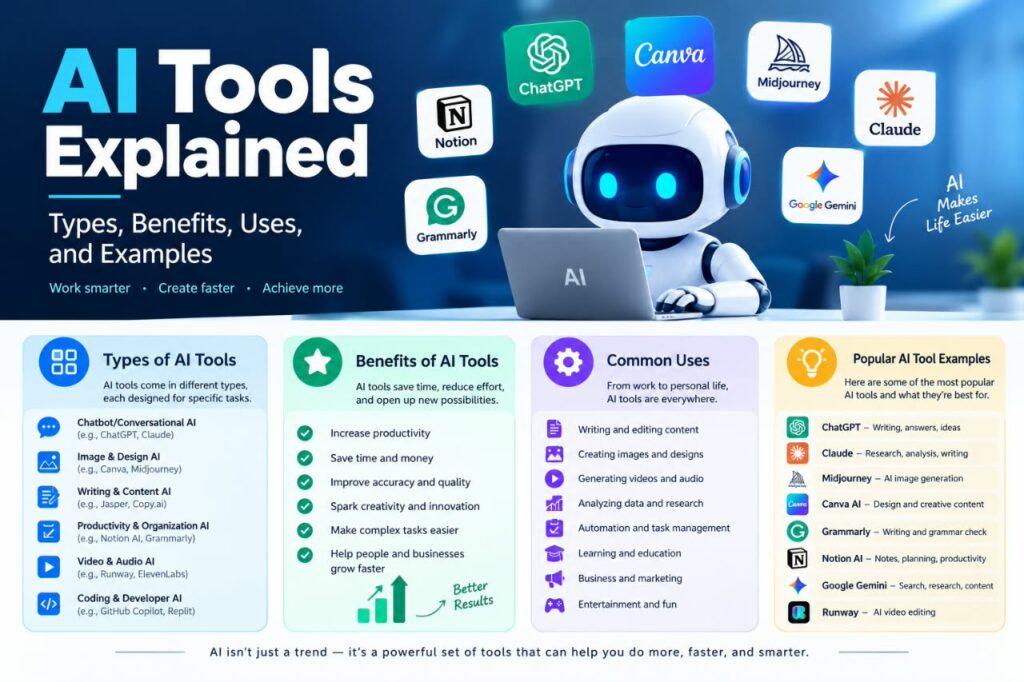
Artificial intelligence has become part of many everyday digital products and services. From writing assistants and image generators to data analysis and customer-support software, AI tools can help people complete a wide range of tasks more efficiently.
But with so many options available, it can be difficult to understand what an AI tool actually is, what different types are available, and when using one makes sense.
This guide provides AI Tools Explained in simple terms. You will learn what AI tools are, how they work at a high level, the main types, common uses, benefits, limitations, and practical tips for choosing the right tool.
What Are AI Tools?
AI tools are software applications or digital systems that use artificial intelligence techniques to perform tasks that normally require some form of human intelligence.
Depending on the technology behind them, AI tools may be able to analyze information, recognize patterns, understand language, generate content, classify data, make predictions, or assist with decision-making.
For example, an AI writing assistant can help organize ideas and draft text. An image-generation tool can create an image based on a written description. An AI-powered data tool may identify patterns in a large dataset.
AI does not necessarily mean that a tool can think like a person. Most AI applications are designed for specific tasks and operate within the capabilities and limitations of their underlying models.
How Do AI Tools Work?
The technology behind AI tools varies, but many modern applications rely on machine-learning models trained using large amounts of data.
A simplified process often looks like this:
- Data is collected or provided — The system receives information such as text, images, audio, or numerical data.
- An AI model processes the information — The model uses patterns learned during training to interpret or generate an output.
- The tool produces a result — Depending on its purpose, it may generate text, classify information, create an image, summarize content, or provide another type of output.
- A user reviews the result — Human review remains important, especially when accuracy matters.
The exact technology can differ significantly between tools. Some use machine learning, natural language processing, computer vision, generative AI, recommendation systems, or combinations of these technologies.
Main Types of AI Tools
AI tools cover many different tasks. Understanding their categories makes it easier to identify the right solution for a particular need.
AI Writing and Text Tools
AI writing tools are designed to work with written language. They can assist with tasks such as:
- Brainstorming ideas
- Creating outlines
- Summarizing information
- Rewriting text
- Improving grammar and clarity
- Drafting emails
- Creating content variations
- Answering questions
These tools can save time during the drafting process, but users should review generated information for accuracy, tone, originality, and context.
AI Image Generation Tools
AI image tools can generate or modify visual content based on instructions or other inputs.
Common applications include:
- Concept development
- Illustrations
- Marketing graphics
- Blog visuals
- Design experimentation
- Creative projects
The capabilities and licensing terms differ between platforms, so anyone using generated images commercially should check the specific service’s terms before publishing or selling the work.
AI Video Tools
AI video software can assist with different parts of video production.
Depending on the tool, features may include:
- Automated subtitles
- Video editing assistance
- Text-to-video generation
- Background removal
- Voice generation
- Script assistance
- Video enhancement
AI can simplify parts of the production process, but creative direction and quality control still matter.
AI Audio and Voice Tools
AI audio applications can work with speech, sound, and music-related tasks.
Examples include tools that can:
- Convert speech into text
- Generate synthetic voices
- Clean up recordings
- Translate spoken content
- Create audio from written text
Users should pay attention to consent, copyright, licensing, and applicable rules when working with voices or recordings.
AI Coding Tools
AI coding assistants can support software developers by helping with programming-related tasks.
They may assist with:
- Explaining code
- Generating code examples
- Finding potential errors
- Creating documentation
- Suggesting improvements
- Converting code between languages
- Generating tests
Generated code should always be reviewed and tested. An AI assistant can produce code that looks reasonable but contains bugs, security problems, or incorrect assumptions.
AI Data Analysis Tools
Some AI tools help users work with large or complex datasets.
They can assist with tasks such as:
- Finding patterns
- Summarizing datasets
- Classifying information
- Creating explanations
- Identifying unusual values
- Supporting data exploration
The quality of the output depends heavily on the quality of the underlying data and the way the task is defined.
AI Customer Service Tools
Businesses increasingly use AI systems to assist with customer support.
These systems may answer frequently asked questions, classify support requests, summarize conversations, or help human agents find relevant information.
For complicated or sensitive issues, human involvement may still be necessary.
AI Productivity Tools
AI productivity tools are designed to assist with everyday work.
They may help users:
- Organize information
- Summarize meetings
- Manage notes
- Draft messages
- Create task lists
- Search documents
- Automate repetitive workflows
The most useful productivity applications often combine AI with traditional software features rather than relying on AI alone.
AI Tool Selection by Task
Choosing an AI tool is easier when you start with the task you want to complete rather than the name or popularity of a particular product.
| Task | Relevant AI Tool Type | Features to Look For |
|---|---|---|
| Write or improve content | AI Writing and Text Tools | Writing, editing, summarization, and rewriting |
| Create visual content | AI Image Generation Tools | Image generation, editing, and customization |
| Produce videos | AI Video Tools | Editing, captions, generation, and enhancement |
| Work with audio | AI Audio and Voice Tools | Transcription, voice generation, and audio cleanup |
| Write or understand code | AI Coding Tools | Code generation, debugging, testing, and explanations |
| Analyze information | AI Data Analysis Tools | Data processing, pattern detection, and summaries |
| Support customers | AI Customer Service Tools | FAQ responses, conversation summaries, and request classification |
| Organize everyday work | AI Productivity Tools | Notes, summaries, task management, and automation |
The same AI tool may support several tasks, but its usefulness depends on how well its features match the specific job you need to complete.
My Practical Recommendation: Identify your main task first, then compare tools within the relevant category. This can help you avoid choosing a tool simply because it is popular or offers more features than you actually need.
Common Uses of AI Tools
AI tools can be useful in many professional, educational, and creative situations.
Content Creation
Writers, bloggers, marketers, and businesses can use AI tools to brainstorm topics, create outlines, summarize source material, or improve drafts.
However, AI-generated content should not simply be published without review. Human editing is important for accuracy, originality, useful context, and a consistent brand voice.
Education and Learning
Students and learners can use AI tools as study assistants.
For example, an AI tool can help explain a difficult concept, generate practice questions, organize notes, or provide examples.
The best approach is to use AI to support learning rather than simply copying answers. Users should also follow their school’s or institution’s rules regarding AI-assisted work.
Business and Marketing
Businesses can use AI for a variety of activities, including:
- Market research support
- Content planning
- Customer-service assistance
- Data analysis
- Email drafting
- Workflow automation
- Idea generation
AI can support employees, but important business decisions should be based on appropriate evidence and human judgment.
Software Development
Developers can use AI coding assistants to speed up routine tasks, explore possible solutions, and understand unfamiliar code.
AI can be especially useful for generating starting points, but developers remain responsible for testing, reviewing, and maintaining the final software.
Design and Creativity
Designers and creators can use AI tools to explore concepts quickly.
For example, someone designing a website might use an image-generation system to explore different visual directions before creating the final design.
AI can therefore function as a creative assistant rather than a replacement for the entire creative process.
Research and Information Management
AI tools can help organize and summarize information from documents and other sources.
For research-heavy tasks, however, users should verify important claims against reliable original sources. AI-generated answers can contain errors or incomplete information.
AI Tools by Use Case: What to Look For
Different tasks require different AI capabilities. Instead of choosing a tool based only on its popularity, consider the features that are most useful for your specific use case.
| Use Case | Important Features to Look For |
|---|---|
| Content Creation | Writing assistance, editing, brainstorming, and content organization |
| Education and Learning | Explanations, practice questions, summarization, and learning support |
| Business and Marketing | Content planning, data analysis, automation, and customer support |
| Software Development | Code generation, debugging, testing, and code explanations |
| Design and Creativity | Image generation, editing, customization, and creative controls |
| Research and Information Management | Document analysis, summarization, source support, and information organization |
| Customer Support | FAQ handling, conversation summaries, request classification, and human handoff |
| Productivity | Task management, meeting summaries, note organization, and workflow automation |
The most useful features depend on the task, the user’s workflow, and the level of control required. A tool with many features may not be useful if it does not support the specific work you need to complete.
My Practical Recommendation: Start with your primary use case and identify the two or three features that matter most. Then compare tools based on those requirements rather than choosing a tool simply because it offers the largest feature set.
Benefits of AI Tools
When used appropriately, AI tools can provide several practical benefits.
1. Saving Time
AI can automate or accelerate repetitive tasks such as summarizing text, organizing information, or creating initial drafts.
This can give users more time to focus on activities requiring judgment and creativity.
2. Supporting Productivity
AI tools can help users move from an idea to a workable first draft or plan more quickly.
For example, instead of starting an outline from a blank page, a writer can use AI to generate possible structures and then improve them manually.
3. Helping With Brainstorming
AI can provide alternative ideas, examples, questions, or approaches.
This can be useful when someone is stuck or wants to consider a problem from several perspectives.
4. Handling Large Amounts of Information
Some AI systems can help users organize and summarize substantial amounts of information.
This does not mean the AI has perfectly understood every detail, so important information should still be checked.
5. Improving Accessibility
AI-powered speech recognition, translation, text assistance, and other features can make certain digital tasks easier for people with different needs.
The usefulness of these features depends on the quality of the particular tool and the user’s situation.
Limitations and Risks of AI Tools
Understanding AI Tools Explained also means understanding what AI cannot reliably do.
AI Can Make Mistakes
AI-generated responses can be inaccurate, incomplete, outdated, or misleading.
A confident-sounding answer is not automatically a correct answer.
For important subjects, verify information using reliable and current sources.
AI May Lack Context
AI systems may not fully understand the specific circumstances surrounding a request.
Providing clear instructions and relevant context can improve the usefulness of the output, but human judgment remains important.
Privacy Can Be a Concern
Users should be careful about entering confidential, personal, financial, business-sensitive, or otherwise private information into AI services.
Before using an AI platform, review its privacy practices and understand how submitted information may be handled.
Copyright and Ownership Issues
AI-generated content can raise questions about copyright, licensing, ownership, and the use of source material.
Rules and platform policies can vary by jurisdiction and service. If content will be used commercially, check the relevant terms and applicable laws.
AI Can Produce Biased Results
AI systems learn from data and design choices. As a result, their outputs can sometimes reflect limitations or biases present in their training data or implementation.
Critical review is important, particularly when AI is used for decisions that affect people.
Some AI Tools Cost Money
Many AI services offer free features, while others use subscriptions, usage limits, credits, or business pricing.
A tool should be evaluated based on whether its capabilities justify its cost rather than simply choosing the tool with the largest number of features.
AI Tools vs. Traditional Software
AI tools and traditional software are not necessarily competing categories.
Traditional software generally follows explicitly programmed rules and workflows. AI-enabled software can use learned patterns to interpret inputs, generate outputs, or adapt to less structured tasks.
For example, a traditional calculator follows mathematical operations precisely. An AI writing assistant can generate different responses based on the context of a request.
Both approaches have value. For tasks requiring predictable and exact results, traditional software may be preferable. AI can be especially useful for tasks involving language, patterns, classification, or generation.
How to Choose the Right AI Tool
There is no single best AI tool for everyone. The right choice depends on your task, budget, workflow, and requirements.
Step 1: Define Your Goal
Start with the problem you want to solve.
Instead of asking, “Which AI tool is best?” ask:
“What do I need the tool to help me accomplish?”
For example, your goal might be writing blog outlines, analyzing data, editing videos, generating images, or organizing documents.
Step 2: Compare Relevant Features
Look for features that directly support your goal.
Consider:
- Ease of use
- Output quality
- Supported formats
- Integrations
- Usage limits
- Collaboration features
- Privacy controls
- Export options
Step 3: Check Pricing
Compare free plans, subscriptions, usage limits, and additional charges.
A free tool may be enough for occasional use, while a professional workflow may require a paid plan.
Step 4: Review Privacy and Terms
Before uploading information, understand how the service handles user data.
For business or confidential work, privacy and data-handling policies should be an important part of the decision.
Step 5: Test Before Committing
If a service offers a free version or trial, test it with realistic tasks.
This gives you a better idea of whether its output quality and workflow actually match your needs.
AI Tool Evaluation Checklist
Before committing to an AI tool, use this checklist:
- Does it solve your main problem?
- Does the output quality meet your needs?
- Are the features you need available on your plan?
- Are the usage limits practical for your workload?
- Is the pricing reasonable for how often you will use it?
- Does it work with your existing workflow?
- Are the privacy and data-handling terms acceptable?
- Can you easily export or use the results elsewhere?
- Does the tool provide enough control over the output?
- Would using this tool actually save you time?
My Practical Recommendation: Evaluate an AI tool using a real task you regularly perform. If it produces useful results and improves your workflow without creating unnecessary extra work, it may be worth keeping.
Tips for Using AI Tools Effectively
Getting useful results often depends on how you interact with the tool.
Give Clear Instructions
Instead of a vague request, explain the task, audience, format, and desired result.
For example, specify whether you need a short summary, a detailed explanation, a table, an outline, or a beginner-friendly answer.
Provide Relevant Context
AI tools generally perform better when they have enough information about the task.
Include important constraints, requirements, examples, or background information when appropriate.
Review Every Important Output
Do not assume generated content is automatically correct.
Check facts, calculations, names, dates, references, and other important details.
Use AI as an Assistant
AI is often most useful when combined with human judgment.
A productive workflow can be:
Plan → Generate → Review → Correct → Improve → Finalize
This approach allows AI to handle useful parts of the process while the human remains responsible for the final result.
Examples of AI Tool Workflows
Here are a few simple examples of how AI can fit into everyday work.
Example 1: Blogger
A blogger might use AI to:
- Brainstorm article ideas.
- Organize an outline.
- Identify questions readers may have.
- Create a first draft.
- Fact-check important information.
- Add original examples and expertise.
- Edit the article before publishing.
The AI supports the workflow, while the final article is reviewed and improved by the writer.
Example 2: Student
A student might use AI to:
- Ask for a simple explanation of a difficult concept.
- Request examples.
- Generate practice questions.
- Attempt the questions independently.
- Use AI to identify areas that need further study.
This makes AI a learning aid rather than a substitute for understanding.
Example 3: Small Business
A small business owner might use AI to:
- Brainstorm marketing ideas.
- Draft a customer email.
- Summarize customer feedback.
- Organize common questions.
- Review and edit the final communication.
Human review remains important because the business is responsible for what it communicates to customers.
How to Improve an AI Workflow
An AI workflow becomes more useful when each part of the process has a clear purpose. Instead of asking one AI tool to handle everything, divide the work between AI assistance and human judgment.
1. Give AI the Right Task
Use AI for tasks where it can provide practical assistance, such as brainstorming, summarizing, drafting, organizing information, or generating initial ideas.
2. Keep Human Judgment in the Process
People should remain responsible for decisions that require context, experience, creativity, or accountability. AI can provide suggestions, but the final decision should be reviewed by the user.
3. Add a Verification Step
Check important facts, figures, sources, names, dates, and other information before using the final output. This is especially important when inaccurate information could cause problems.
4. Use Different Tools When Necessary
One AI tool may not be suitable for every stage of a project. If another tool provides a feature that is specifically needed, it may make sense to use it for that part of the workflow.
5. Review the Final Result
Before publishing, submitting, or sharing AI-assisted work, review the complete result for accuracy, clarity, quality, and consistency with your original goal.
My Practical Recommendation: Align your work with the task at hand rather than focusing on building a specific AI tool. Let AI handle useful support functions while keeping human review, verification, and final decision-making as integral parts of the process; this helps you optimize the workflow.
Are AI Tools Free?
Some AI tools offer free access, but free versions commonly have limitations.
Possible restrictions include:
- Daily or monthly usage limits
- Fewer features
- Lower output limits
- Limited storage
- Reduced access to advanced models
- Watermarks or export restrictions
Paid plans may provide additional capabilities, but pricing and features can change. Always check the official pricing page of the specific tool before making a purchase decision.
Are AI Tools Safe to Use?
AI tools can generally be used safely when users understand their limitations and use appropriate privacy practices.
Avoid entering sensitive information unless you understand how the service handles that information.
For important decisions involving legal, financial, medical, employment, or other high-stakes matters, AI should not be treated as the sole source of advice. Verify relevant information with qualified professionals or authoritative sources when appropriate.
The Future of AI Tools
AI tools are continuing to evolve. Their capabilities, interfaces, pricing models, and applications can change quickly.
Future AI applications may become more integrated into everyday software, making AI features available directly inside tools people already use.
At the same time, questions about privacy, security, copyright, reliability, transparency, and responsible use will remain important.
For users, the most valuable skill may not be knowing every new AI product. It is understanding how to evaluate these tools, use them responsibly, verify their output, and decide when human expertise is necessary.
Frequently Asked Questions About AI Tools
1. What are AI tools used for?
AI tools can assist with tasks such as writing, research, image creation, video editing, coding, data analysis, customer support, translation, and productivity. The exact capabilities depend on the individual tool.
2. Are AI tools completely accurate?
No. AI tools can produce incorrect, incomplete, or outdated information. Important information should be verified using reliable sources, especially when accuracy is critical.
3. Can beginners use AI tools?
Yes. Many AI tools are designed with simple interfaces that beginners can use. Starting with a clearly defined task and learning the tool’s basic features is usually a practical approach.
4. Are free AI tools available?
Yes. Some AI services provide free plans or limited free features. However, usage limits and available features vary, so users should check the current terms of each service.
5. Should AI replace human judgment?
AI is generally most useful as an assistant rather than an automatic replacement for human judgment. People should review important outputs, consider context, and take responsibility for final decisions.
Conclusion
AI Tools Explained is ultimately about understanding what these technologies can—and cannot—do.
AI tools can support writing, design, coding, research, productivity, data analysis, customer service, and many other activities. Their biggest practical value often comes from helping people work through repetitive or time-consuming tasks more efficiently.
However, AI is not infallible. Users need to consider accuracy, privacy, copyright, cost, bias, and other limitations before relying on an AI-generated result.
The best approach is to choose tools based on a specific need, learn how they work, verify important information, and combine AI assistance with human judgment. Used thoughtfully, AI tools can become useful additions to both personal and professional workflows.